bunx aislop scan --share: Public Report Link and README Badge
From the first scan to a shareable report in three commands, with what each part of the output means.
aislop is an open-source CLI that
scans a repository for AI slop and scores it from 0 to 100. Version 0.20.0 adds
aislop scan --share, which prints a public report link and a README badge.
This post covers the commands end to end. For every runner in one table, see
npx, bunx, pnpm dlx, uvx.
1. Run the scan
From the project root, pick the line that matches your toolchain:
bunx aislop scan                   # Bun (Node.js 20+ also on PATH)
npx aislop@latest scan             # npm
pnpm dlx aislop scan               # pnpm
brew install scanaislop/tap/aislop # Homebrew, then: aislop scan
pipx install aislop                # Python (or pip install --user aislop), then: aislop scan
No account or API key is needed. The scan runs locally and does not send your code anywhere. Anonymous usage telemetry is on by default; the telemetry docs list exactly what is sent and how to turn it off.
2. Read the output
This is the summary from a real scan of a small agent-written TypeScript project:
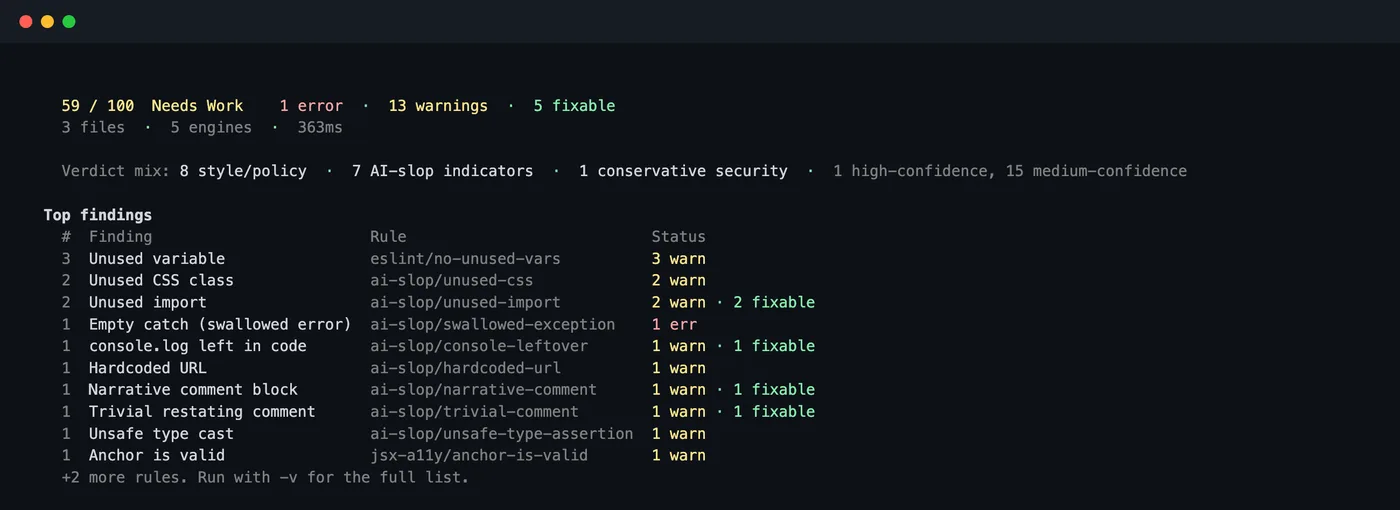
- Score and band. 75 to 100 is Healthy, 50 to 74 Needs Work, below 50 Critical. Errors cost more than warnings. See scoring.
- Engines. Formatting, Linting, Code Quality, AI Slop and Security each report separately above the summary, with file and line for every finding.
- Fixable. Findings marked
[auto]can be removed withaislop fix. - Top findings. Counts per rule, so you can see which pattern dominates. Add
-vfor the full list.
What each finding looks like in code, with fixes, is in another AI slop code example, scanned.
3. Share it: aislop scan --share
bunx aislop scan --share
# or
npx aislop@latest scan --share
For a project whose origin remote points at GitHub (HTTPS, SSH, or
ssh://git@github.com/...), the scan ends with a Share block. Here it is on
the aislop repository itself:
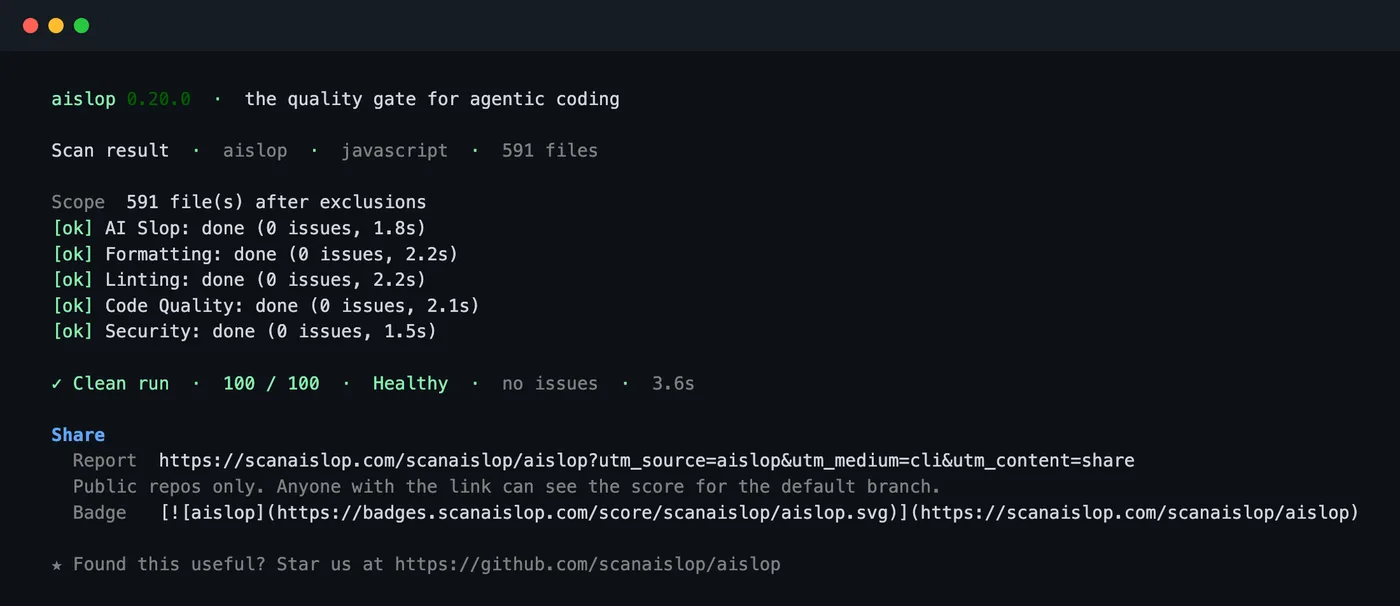
Two things are printed:
- Report:
https://scanaislop.com/<owner>/<repo>, a public page for the repository. - Badge: markdown you can paste into your README.
[](https://scanaislop.com/<owner>/<repo>)The link is built from the local remote. Nothing is uploaded and the command makes no network call for it. If the remote is not on GitHub, aislop says so and prints no link.
What the public report page shows
The report page scans the public repo's default branch on its own, so anyone with the link sees the same score you would get locally. This is scanaislop.com/scanaislop/aislop:
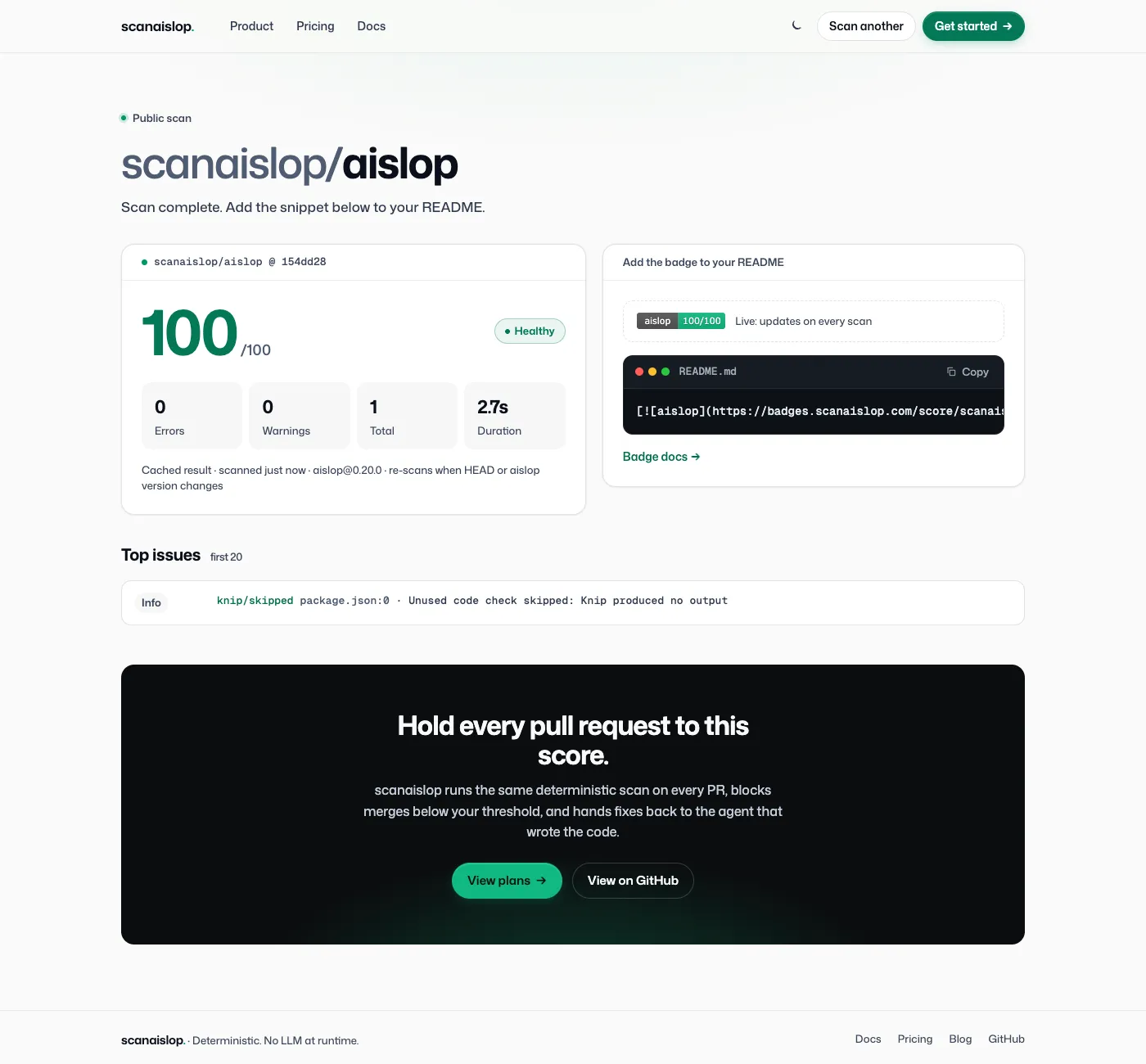
It shows the score and band, error and warning counts, the commit it scanned, the top issues, and the badge snippet. Results are cached and re-scanned when the default branch's HEAD or the aislop version changes. Private repos are not supported. You can also scan any public repo from the browser at /try without running the CLI. Badge styles and options are in badge docs.
When the hint appears
Interactive scans now end with Share this report: aislop scan --share. The
hint is left out of JSON and SARIF output, piped output, CI runs, aislop ci,
and runs that already pass --share, so scripts are not affected.
Next: keep the score from dropping
aislop fix                    # remove the mechanical findings
aislop init                   # write .aislop/config.yml and a GitHub Actions workflow
aislop ci                     # JSON output, non-zero exit below your threshold
aislop hook install --claude  # scan after every edit your agent makes
aislop ci fails the build when the score drops below the threshold or any
error-severity finding is present. Details are in the CI docs,
the command reference and
agent hooks. For an overview of how
detection works, read what aislop is.
Frequently asked questions
What does aislop scan --share do?
For a project with a GitHub origin remote, it prints the public report link https://scanaislop.com/<owner>/<repo> and the README badge markdown. It reads the remote locally: nothing is uploaded and no network call is made. The report page then scans the public repo itself.
Does --share work for private repositories?
No. The link is printed for any GitHub remote, but the public report only works for public repos.
Is bunx aislop scan the same as npx aislop scan?
Yes. Both download the same npm package and run the same CLI, so the score is identical. Bun still needs Node.js 20 or later on PATH because the CLI uses a Node shebang.
Can I install aislop with pip?
Yes. pipx install aislop or pip install --user aislop installs a launcher from PyPI that runs the matching npm release. Node.js must be on PATH.
Which version added --share?
aislop 0.20.0, released on 2026-11-01.