AI Slop Website Example: The Code Behind a Generated Landing Page
What a generated landing page looks like, what its source looks like, and what a real scan of that source reports.
Most lists of AI slop website examples stop at the screenshot: purple gradients, emoji feature grids, testimonials from people who do not exist. We covered those visual tells in 12 tells of a generated site. This post goes one layer down. We built a small landing page the way an unreviewed agent session usually leaves it, ran aislop 0.20.0 on it, and walked through what the scan found and how to fix each part.
What the AI slop website looks like
On the page, the example has the usual set of tells:
- Generic hero copy. "Unlock the power of seamless productivity" says nothing about what the product does or for whom.
- A gradient and a blob. A 135 degree purple-to-blue gradient behind the hero, plus a blurred decorative shape.
- Placeholder testimonials. A testimonial card style exists, waiting for quotes nobody gave.
- A dead call to action. The main button links to
#. - Inconsistent spacing. One-off pixel values in the stylesheet instead of shared spacing tokens.
None of that is visible to a linter as "AI". What is visible is the code that produced it, and that code has the same lack of ownership as the copy.
The code behind it
Three source files. First the hero component:
// src/Hero.tsx
import "./styles.css";

export function Hero() {
console.log("rendering hero");
return (
  <section className="hero-gradient">
    <h1>Unlock the power of seamless productivity</h1>
    <a href="#">Get started</a>
  </section>
);
}
The stylesheet, with classes for sections the page no longer renders:
/* src/styles.css */
.hero-gradient { background: linear-gradient(135deg, #7c3aed, #3b82f6); }
.testimonial-card { padding: 24px; }
.unused-blob { filter: blur(80px); }
And the signup handler the button was supposed to reach:
// src/signup.ts
import { useState } from "react";
import { formatDate } from "./utils";

// This function handles the signup form submission
export async function submitSignup(email: string) {
// Send the email to the API
try {
  const res = await fetch("https://api.acme-staging.internal/v1/signup", {
    method: "POST",
    body: JSON.stringify({ email }),
  });
  const data = (await res.json()) as any;
  return data.user;
} catch (error) {
  // Ignore errors
}
}
Each file runs. The page renders. A quick review would pass it. The problems only show when a signup fails and nobody finds out, or when a staging URL ships to production.
What aislop found
Running npx -y aislop@0.20.0 scan in the project root took under half
a second and scored it 59 / 100 (Needs Work): 1 error, 13 warnings, 5 of them auto-fixable.
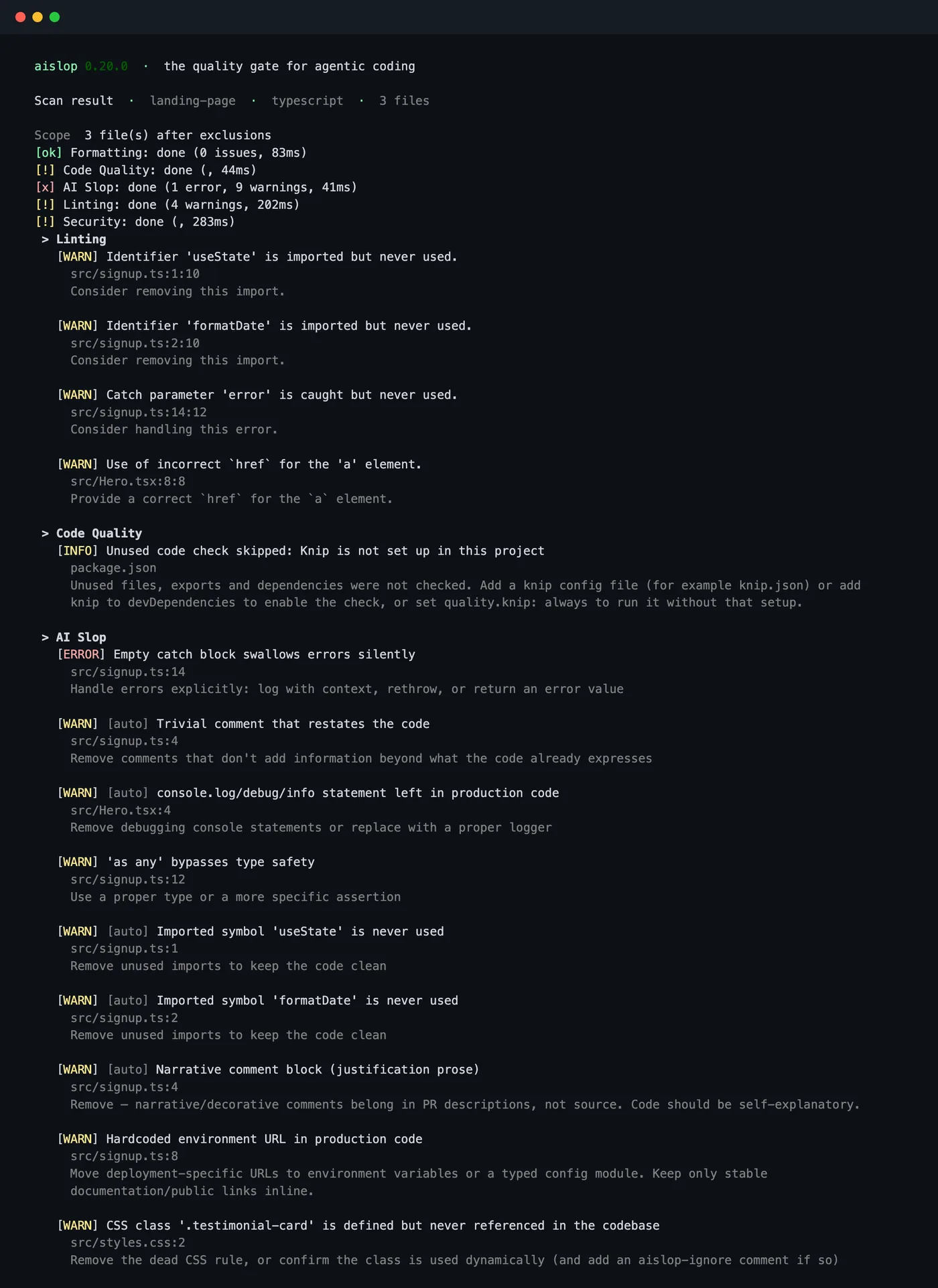
Mapped back to the website tells:
| On the page | In the code | Rule |
|---|---|---|
| Gradient blob, placeholder testimonials | CSS classes nothing references | ai-slop/unused-css |
| "Get started" goes nowhere | href="#" | jsx-a11y/anchor-is-valid |
| Signup silently fails | Empty catch block | ai-slop/swallowed-exception |
| Works on the demo, breaks in prod | Staging API host in source | ai-slop/hardcoded-url |
| Debug noise in the browser console | console.log in render | ai-slop/console-leftover |
| Nothing visible, but any bad response passes through | as any on the response | ai-slop/unsafe-type-assertion |
| Nothing visible, but reviewers read noise | Comments that restate the code, unused imports | ai-slop/narrative-comment, ai-slop/trivial-comment, ai-slop/unused-import |
aislop does not judge the copy or the colour choice. It found the dead CSS left behind by sections that were generated and then dropped, which is often the clearest sign in the source that nobody went back over the page.
The same page, fixed
aislop fix removed the five mechanical findings (both comments, the
console.log and the two unused imports). The rest needed a decision, so they were fixed by hand:
// src/Hero.tsx
import "./styles.css";

export function Hero() {
return (
  <section className="hero-gradient">
    <h1>Track every invoice your team sends, in one inbox</h1>
    <a href="/signup/">Start a free trial</a>
  </section>
);
}
/* src/styles.css */
.hero-gradient { background: linear-gradient(135deg, #7c3aed, #3b82f6); }// src/signup.ts
import { config } from "./config";
interface SignupResponse {
user: { id: string; email: string };
}
export async function submitSignup(email: string): Promise<SignupResponse["user"]> {
const res = await fetch(new URL("/v1/signup", config.apiBaseUrl), {
method: "POST",
headers: { "Content-Type": "application/json" },
body: JSON.stringify({ email }),
});
if (!res.ok) {
throw new Error("Signup failed with status " + res.status);
}
const data: SignupResponse = await res.json();
return data.user;
}The hero now names a concrete outcome, the button goes to a real route, the unused classes are gone, the API host comes from config, and a failed signup throws so the form can show an error. Keeping the gradient is fine; the point is that it is now a choice someone made.
Checklist for your own site
- Read the hero out loud. If it fits any product, rewrite it around one outcome for one reader.
- Delete testimonials, logos and numbers you cannot source.
- Click every link and submit every form. Search the code for
href="#". - Run
npx aislop@latest scanand fix errors first, then unused CSS, then hardcoded URLs. - Pick spacing and colour tokens once and use them everywhere instead of one-off pixel values.
For more code-level patterns with fixes, see another AI slop code example, scanned line by line and 20 AI slop code examples. To run the scan with Bun, pnpm, Homebrew or pip, see bunx aislop scan and --share. New to the tool? Start with what aislop is or the docs.
Frequently asked questions
What is an example of an AI slop website?
A landing page with a buzzword hero ('Unlock the power of seamless productivity'), a purple-to-blue gradient, a blurred blob in the background, testimonials from nobody, and a 'Get started' button that links to #. The code behind it usually has dead CSS, debug logs, empty catch blocks and hardcoded URLs.
Can a tool detect an AI slop website?
Not from the rendered page. aislop scans the source code, so it finds the code-level tells: unused CSS classes, console.log calls, empty catch blocks, as any casts, hardcoded environment URLs and links with href='#'. The copy and design still need a human read.
Why do AI-generated websites look the same?
Models and starter templates converge on the most common patterns in their training data. Without a specific brief, the result is the average landing page: the same gradient, the same three feature cards, the same hero phrasing.
How do I check my own site's code?
From the project root, run npx aislop@latest scan (or bunx aislop scan). It prints a 0 to 100 score and every finding with file and line. No account is needed.